No Shows
Report parameters
|
Field |
Description |
|---|---|
|
Report Name |
The name of the report. |
|
From Date |
The start date from when the data must be considered for generating the report. |
|
To Date |
The end date until when the data must be considered for generating the report. |
Sample Report
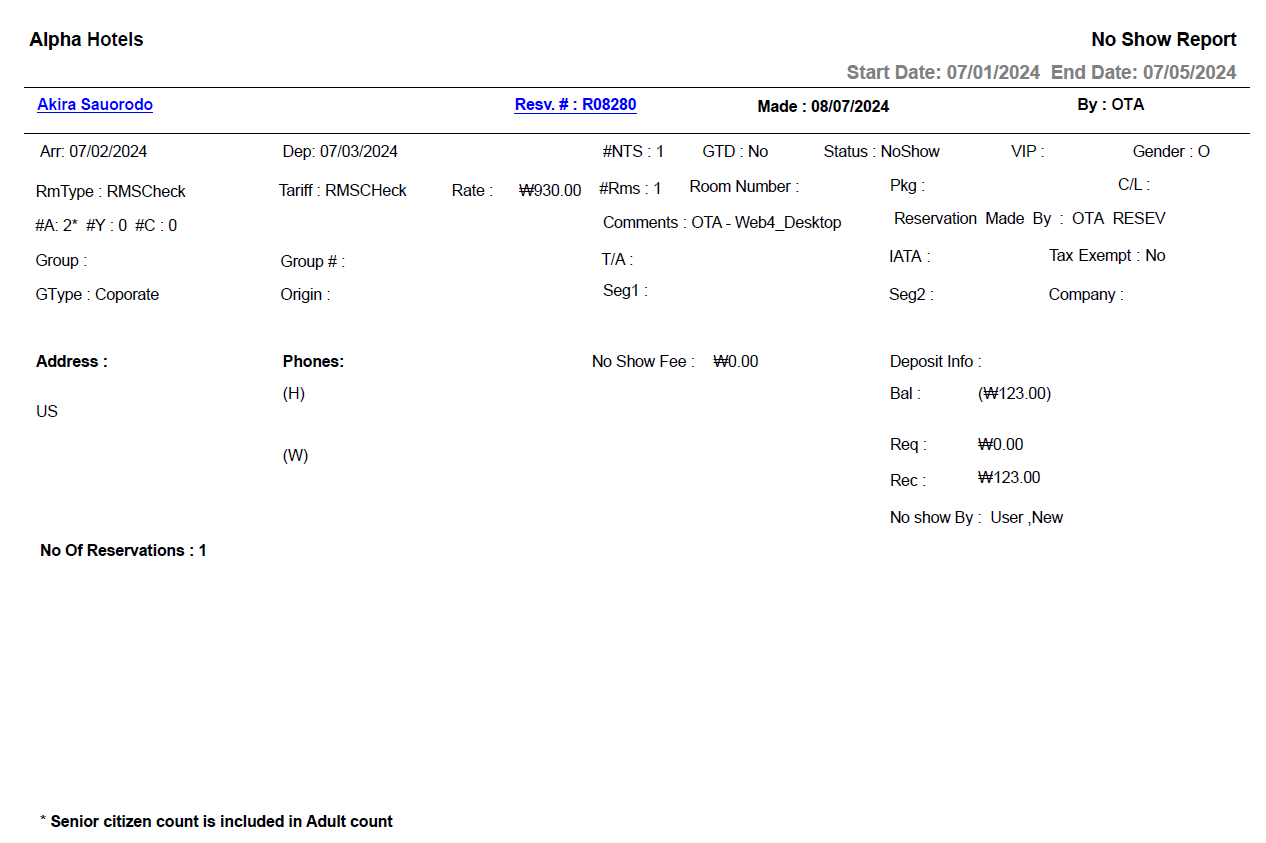
Report Fields
|
Field |
Description |
|---|---|
|
Guest Name |
The name of the guest will appear as a hyperlink and clicking it will navigate the user to the guest record. |
|
Resv # |
The confirmation number of the reservation will appear as a hyperlink and clicking it will navigate the user to the reservation record. |
|
Made |
The date on which the reservation was created. |
|
By |
User ID of the user who created the reservation. |
|
Arr |
The arrival date of the guest. |
|
Dep |
The departure date of the guest. |
|
#NTS |
Number of nights of stay. |
|
GTD |
Indicates whether the guest reservation is guaranteed. |
|
Status |
The status of the reservation. |
|
VIP |
The code that identifies the VIP type of the guest at the property. |
|
Rate |
The rate defined for the selected room type. |
|
Tariff |
The tariff of the preferred room type. |
|
Gender |
The gender of the guest. |
|
RmType |
The room type to which the room number belongs to. |
|
Room Number |
The room number of the guest. |
|
#Rms |
Number of rooms associated with the reservation. |
|
#A |
The number of adults on the reservation. |
|
#Y |
The number of youths on the reservation. |
|
#C |
The number of children on the reservation. |
|
Pkg |
The package selected for the reservation. |
|
Share(s) |
Indicates whether the reservation is a shared reservation or not. |
|
Group |
In case of group reservations, the name of the group is displayed here. |
|
Group # |
The group number associated with the group booking, if any. |
|
Reservation Made By |
The name of the user who created the reservation record. |
|
Comments |
Comments entered by the user, if any. |
|
Address |
The contact address of the guest. |
|
Phones |
|
|
(H) |
The home phone number of the guest. |
|
(W) |
The work phone number of the guest. |
|
Company |
The name of the company to which the guest belongs. |
|
GType |
The guest type selected when creating the reservation. |
|
Origin |
Indicates the guest’s origin, that is, where the guest came from or heard about the property. |
|
Seg1 |
The segment 1 selected when creating the reservation. |
|
Seg2 |
The segment 2 selected when creating the reservation. |
|
Tax Exempt |
Indicates whether the guest type is tax exempted. |
|
T/A |
Indicates whether the reservation is made by a travel agent. |
|
IATA # |
The IATA number of a travel agent associated to the company. |
|
C/L # |
The reservation cancellation number. |
|
No Show Fee |
Displays the amount charged for the No Show reservation |
|
Deposit Info |
|
|
Req |
Deposit request amount. |
|
By |
The date by which the entire deposit amount should be paid. |
|
Rec |
The deposit amount received. |
|
Bal |
The remaining unresolved balance. |